Paw Print Patterns: Practical Design Assets for Creative Professionals and Entrepreneurs
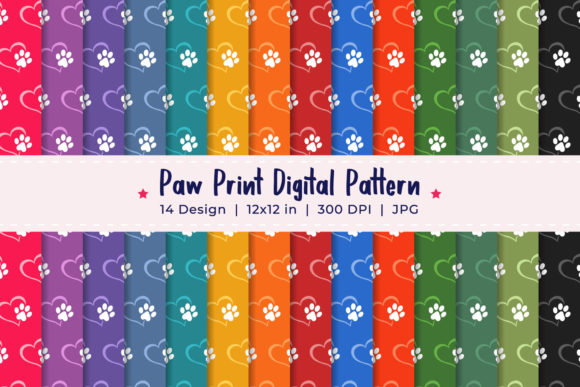
Design assets that balance visual appeal with efficiency are essential for anyone working under deadlines or managing multiple projects. Paw Print Patterns offer a focused collection of 14 high-resolution JPG files, each 12 x 12 inches at 3600 x 3600 pixels, designed to streamline creative work while maintaining professional quality. Understanding where these patterns fit into your workflow, how to prepare them for use, and what practical outcomes they can deliver helps you get the most from this digital download.
What Are Paw Print Patterns and Where Do They Fit?
Paw Print Patterns are pre-made surface designs featuring paw-themed motifs. They serve as background textures, wrapping papers, fabric prints, digital scrapbook papers, or repeating elements for branding and marketing materials. Because they come in a standard square format at high resolution, they integrate directly into common design software such as Adobe Photoshop, Illustrator, Canva, Procreate, Affinity, and many print-on-demand platforms.
For a freelance graphic designer working on a pet boutique’s branding package, these patterns can become the foundation of gift wrap, shopping bags, or social media templates. For a small business owner creating custom merchandise, they eliminate the need to design repeating patterns from scratch, freeing time for layout, copy, and product photography.
Before the Project: Preparation and Asset Library Building
One of the most practical uses of Paw Print Patterns is during the preparation phase of any creative project. Rather than searching for stock images or designing patterns on the fly, you can add these 14 files to your digital asset library. Having them ready before a client brief or product launch allows you to test color combinations, scale, and placement early in the process.
For educators preparing classroom materials, the patterns can be imported into worksheets, lesson plan covers, or bulletin board decorations before the term begins. For bloggers and publishers, pre-selecting a pattern for a series of social media posts ensures visual consistency before writing a single caption. Preparing assets in advance reduces last-minute scrambling and lets you focus on the content and message.
During the Project: Implementation and Integration
When you are in the middle of a project, Paw Print Patterns function as versatile background elements that can be layered, masked, or recolored. Because each file is 3600 x 3600 pixels, you have enough resolution to print at 300 DPI for products like mugs, phone cases, or tote bags without pixelation.
A common workflow for an entrepreneur launching a pet-themed product line might look like this:
- Select a base pattern from the collection that matches the brand’s color palette.
- Open the JPG in your design software and adjust brightness or contrast if needed.
- Layer text or product images over the pattern, using blending modes or opacity adjustments to maintain readability.
- Export for print or web at the required dimensions, knowing the original file maintains quality.
For marketers creating email newsletters or social media graphics, the patterns can be used as section backgrounds, separating content blocks while adding visual interest. The square format is particularly useful for Instagram posts, stories, and profile highlights, where consistent sizing saves time.
After the Project: Archiving and Future Use
Post-project, these patterns become part of a reusable resource folder. Because digital files do not degrade, you can revisit them for seasonal campaigns, new product variations, or client revisions. For freelancers and agencies, this reduces the need to purchase new assets for every project, which is both cost-effective and efficient.
Publishers producing ebooks or planners can archive patterns alongside other design elements, making it easier to update covers or create companion products later. A pattern that worked for a holiday promotion might also suit a clearance sale or a social media giveaway with minimal adjustment.
Compatibility and Integration With Other Tools
Since Paw Print Patterns are standard JPG files, they are compatible with virtually any platform that accepts raster images. This includes:
- Print-on-demand services like Printful, Printify, or Redbubble, where you upload the pattern as a repeatable design or all-over print.
- Presentation software such as PowerPoint, Google Slides, or Keynote for slides, handouts, or templates.
- Video editing tools used for lower thirds, slide backgrounds, or overlay textures in short-form content.
- Planner and journal layouts in programs like GoodNotes, Notability, or Adobe InDesign.
For entrepreneurs who outsource design work, providing a set of Paw Print Patterns to a freelance designer ensures brand consistency without requiring the designer to source original artwork. This clarity reduces back-and-forth revisions and keeps project timelines on track.
Organizing Your Files
Because the set includes 14 separate JPG files, organizing them logically from the start saves time later. Consider creating a folder structure such as:
- Main asset folder named Paw Print Patterns
- Subfolders by theme or color if you prefer
- Naming convention like “PP_01_blue_paw” or “pattern_textured_paw”
Using consistent file names helps when searching for specific patterns across multiple projects. You can also add metadata tags in your operating system or DAM (Digital Asset Management) tool for faster retrieval.
Testing Scale and Repetition
Before committing to a final design, test how the pattern looks at different scales. A repeating paw motif may appear too large on a small product like a notebook or too small on a full-wrap fabric. Open the JPG in your software and use transformation tools to scale the pattern up or down. Some programs allow you to define the pattern as a swatch, which makes repetition seamless.
For print products, always conduct a test print on plain paper to check alignment, color accuracy, and overall density. Digital screens can make patterns look different than they will on physical materials.
Quality Control and Consistency
Since all files are provided at 3600 x 3600 pixels, you can rely on consistent resolution across the set. However, color profiles may vary depending on your monitor calibration and the intended output medium. If you are designing for print, convert the JPGs to CMYK before final export. For web use, sRGB is standard.
When working with multiple patterns in a single project—for example, a product line with different paw prints for different items—check that the overall aesthetic remains coherent. Minor adjustments in brightness, saturation, or contrast can unify patterns that feel slightly different.
For a Small Business Owner
You run an online store selling pet accessories and want to launch a limited edition gift wrap. Download the Paw Print Patterns, choose two complementary designs, and upload them to your print-on-demand supplier. Within a day, you have product mockups ready for your website. No design software expertise required beyond basic file upload.
For a Freelance Designer
A client requests a series of social media posts for International Dog Day. You open one of the patterns as a background, overlay a quote and brand logo, and export square versions for Instagram. Because the pattern is consistent across posts, the feed looks curated. You complete the set in under two hours instead of building each background from scratch.
For an Educator or Tutorial Creator
You produce printable coloring pages or activity sheets for a community event. The patterns can be used as decorative borders, page backgrounds, or cut-out elements for craft projects. The high resolution ensures clean prints on standard home printers when scaled to letter size.
For a Publisher or Blogger
You are formatting an ebook about pet care. Use a subtle paw pattern as a chapter divider or full-page background for section title pages. Because the file is 12 x 12 inches, it covers standard ebook dimensions with room to crop. You can also use it as a cover wrap if you design a paperback edition.
Long-Term Value and Reusability
One of the strongest advantages of a pattern collection like this is its staying power. Unlike trend-driven graphics that may feel dated after a season, paw prints have enduring appeal for pet-themed projects. They can be used year after year for holiday promotions, new product lines, or personal projects like pet birthday invitations or photo album backgrounds.
For entrepreneurs who run seasonal or subscription businesses, patterns can be rotated to keep offerings fresh without investing in entirely new design assets every quarter. Pairing different patterns with different color overlays or text treatments extends their usefulness further.
Because the download is digital, there is no risk of physical damage, loss, or fading. You can store the files on cloud drives, external hard drives, or directly in application libraries. Backups are simple, and you can access them from any device.
Observations on Preparation and Usability
While JPG files are widely compatible, they do not support transparency like PNG or SVG. If you plan to use a paw pattern as an overlay or a watermark, you may need to isolate the pattern in an image editing program. Similarly, if you intend to create a repeating tile that blends seamlessly edge to edge, test the file in your software’s pattern preview mode. Some JPGs may have slight seams that require adjustment.
If you are unfamiliar with setting up patterns for repeat, search for tutorials specific to your design program. Most modern applications allow you to define a custom pattern from any image, and the square format of these files makes the process straightforward.
For users who prefer working with vector files, these patterns can be traced or manually redrawn if necessary, but for the vast majority of raster-based projects, the provided JPGs are production-ready.
Final Practical Considerations
When purchasing digital downloads, always verify the license terms. This set is intended for personal and commercial use, but it is good practice to confirm any restrictions around reselling or redistribution. Proper attribution is rarely required for pattern packs, but it is courteous to note the source when possible.
Keep your files organized in a dedicated design resources folder. Label the folder clearly and include a brief note about the resolution and format so you can quickly identify the best file for each project. As your library grows, this habit prevents frustration.
If you appreciate the quality and versatility of this set, leaving a rating with 5 stars helps other creators find reliable assets and supports the designer who created them. It also encourages more pattern packs with similar attention to resolution and usability.
Paw Print Patterns are not just decorative elements; they are practical tools that fit into any stage of a creative workflow. Whether you are preparing assets before a launch, executing a design during a project, or archiving resources for future use, having a set of high-resolution, consistent files simplifies the process and helps you produce professional results with less effort.