Seamless Floral Leaf Patterns Bundle: A Practical Guide for Creative Projects and Print-on-Demand Workflows
Design consistency and visual appeal are often the difference between a product that sells and one that sits in inventory. For creators, small business owners, and print-on-demand entrepreneurs, having reliable, high-quality pattern assets can streamline production and elevate the final result. The Seamless Floral Leaf Patterns Bundle offers exactly that: a collection of versatile, print-ready designs that fit naturally into a wide range of creative workflows. This article explores what the bundle contains, how it integrates into real projects, and practical ways to make the most of it from preparation through final output.
What Is the Seamless Floral Leaf Patterns Bundle?
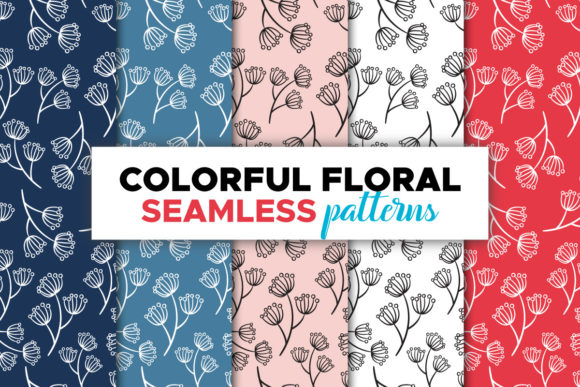
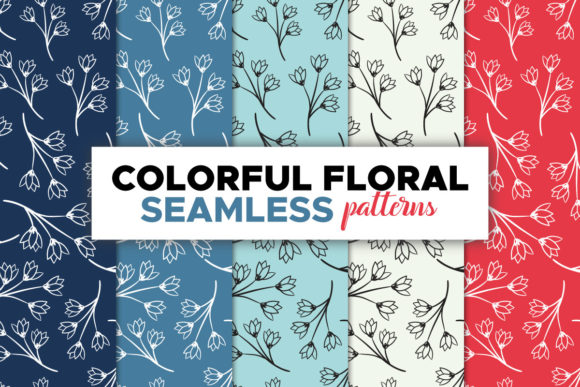
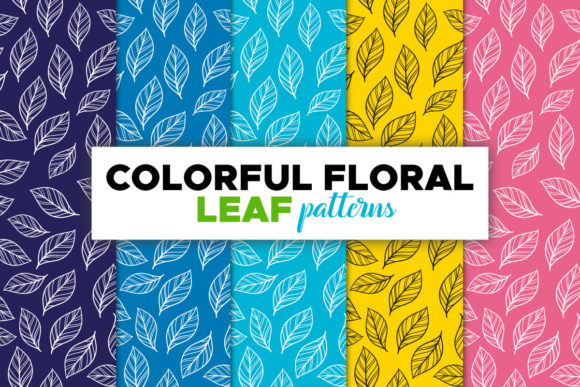
At its core, this bundle is a set of seamless floral and leaf-themed background patterns designed for immediate use in product design. The bundle includes five distinct, colorful patterns, each paired with a different cool-toned background. Because the patterns are seamless, they tile infinitely without visible seams, making them suitable for everything from small surface areas like mugs to large formats such as posters.
The files come in three formats: editable AI and EPS vector files at 3000 x 2000 pixels, 300 PPI, plus five JPEG raster images at a generous 4000 x 4000 pixels, also at 300 PPI. A guide text file is included to help you navigate the vector files if you are less familiar with Adobe Illustrator or EPS workflows. Color mode is CMYK throughout, so what you see on screen translates reliably to print.
Where the Bundle Fits in Your Creative Process
Pattern assets like these are most useful at two key stages: during the initial design phase and just before final production. In the design phase, the seamless floral leaf patterns serve as a foundation or accent element. You can use them as the primary print for a T-shirt, the background for a notebook cover, or the wrap design for a mug. Because they are seamless, you do not need to worry about alignment or repetition breaks when scaling them across different product dimensions.
Before production, the CMYK color mode and high resolution mean you can place the patterns into your design software, adjust size or rotation, and export directly for your print provider. This removes the need for last-minute color conversions or resampling, reducing errors and delays.
If you work with multiple POD platforms such as Printful, Printify, Redbubble, or Society6, the bundle provides a consistent visual language across your product catalog. You can apply the same pattern to different products without reworking the artwork each time.
T-Shirt and Apparel Designs
For apparel, the JPEG files at 4000 x 4000 pixels give you enough resolution for even full-front or full-back prints on larger sizes. If you need to resize the pattern to fit a specific placement area, the vector AI and EPS files allow you to scale without quality loss. Consider duplicating the pattern layer and adjusting opacity or blending modes to create a subtle secondary effect behind a central graphic. Because the backgrounds are cool-toned, they pair well with neutral or warm foreground elements without clashing.
Mugs, Bags, and Hard Goods
Products like mugs and bags often require artwork that wraps around curved or irregular surfaces. The seamless nature of these patterns ensures that the design repeats naturally, so you do not end up with awkward edges or gaps. For mugs, place the pattern as a full wrap and add a text or logo overlay near the center. For tote bags, the 3000 x 2000 pixel vector files give you enough flexibility to position the pattern on the front panel while leaving the handles and sides clean.
Notebooks and Stationery
Notebook covers, journals, and planners benefit from patterns that are visually engaging but not distracting. The floral leaf designs in this bundle strike a good balance: they are detailed enough to be interesting at close range but cohesive enough to work as a background for titles or labels. Use the JPEG files directly as full-bleed cover images, or open the AI file to add a thin border or geometric overlay that gives the design a structured feel.
Posters and Wall Art
For larger prints, resolution matters. The 4000 x 4000 pixel JPEGs at 300 PPI translate to a print size of roughly 13 x 13 inches at full quality, and you can scale up slightly if needed thanks to the seamless tiling. If you want a poster larger than that, use the vector files, which are resolution-independent. The five different backgrounds give you variety within a single product line; you can offer the same poster design in multiple colorways using different patterns from the bundle.
Working with the File Formats
Understanding the strengths of each file format will save you time and reduce friction in your workflow.
- AI file (editable, 3000 x 2000 px, 300 PPI): Open this in Adobe Illustrator if you need to change colors, remove elements, or combine the pattern with vector graphics. Because it is fully editable, you can adjust individual leaves, modify backgrounds, or export to other formats. This is your primary file for customization.
- EPS file (editable, 3000 x 2000 px, 300 PPI): EPS is a widely compatible vector format that works in Illustrator, CorelDRAW, Affinity Designer, and many other vector applications. Use this if you do not have Illustrator or if you are sharing files with a collaborator who uses different software. It preserves the same editable structure as the AI file.
- Five JPEG images (4000 x 4000 px, 300 PPI, CMYK): These are raster files ready for direct placement into design tools like Photoshop, Canva, or even PowerPoint. They work well when you do not need to edit the pattern itself, just apply it. The high resolution ensures sharp output on most product sizes.
- Guide text file: This file explains how to open and work with the AI and EPS files, including tips on layers, color adjustments, and export settings. Read it once before starting to avoid common mistakes like accidentally flattening layers or saving in the wrong color space.
Integrating the Bundle with Your POD Workflow
Print-on-demand success depends on speed and consistency. Here is a typical workflow that incorporates the Seamless Floral Leaf Patterns Bundle from preparation to listing.
- Organize your files. After downloading the zip archive, extract it to a dedicated folder on your computer or cloud storage. Name the folder clearly, for example "Floral Leaf Patterns Bundle – CMYK." This saves time when you need to locate files later for new product variations.
- Select a pattern and product. Choose one of the five JPEG or vector patterns based on the product's dimensions and orientation. For square products like notebooks or pillows, the square JPEG files are a natural fit. For rectangular products like T-shirts or posters, you may want to use the vector files to adjust aspect ratio without cropping important elements.
- Place and position. Open your design tool and import the file. If you are using the JPEG, simply drag it onto your canvas. If you need to resize non-proportionally, use the vector files instead to avoid pixelation. Most POD platforms require a minimum of 150 to 300 PPI; your files already meet or exceed that standard.
- Add overlays. Add text, logos, or additional graphics on top of the pattern. Because the backgrounds are cool and varied, test contrast with your foreground elements. Light text on darker pattern areas or dark text on lighter areas will ensure readability.
- Export for print. Export your final design as a PNG or JPEG at 300 PPI, CMYK color mode, and the exact dimensions required by your POD provider. Avoid converting from RGB at the last minute; since your source files are already CMYK, you maintain color fidelity throughout.
- Upload and list. Upload the exported file to your POD platform, set your product options, and write your listing description. The cohesive look of the pattern bundle means you can create a matching product line by using different patterns from the same set across multiple items.
Preparation, Quality Control, and Consistency
Before you start designing, take a few minutes to verify a few technical details. First, confirm that your design software is set to CMYK color mode. If you open the AI or EPS file in a workspace that defaults to RGB, the colors may shift when you later convert for print. The included guide text file explains how to check and adjust these settings in Illustrator.
Second, inspect the pattern at full resolution on screen. Zoom in to ensure that the seamless tiling is clean and that there are no unintended artifacts at the edges. The files in this bundle are professionally prepared, but it is good practice to verify before committing to a production run, especially if you plan to scale the pattern significantly.
For long-term use, keep the original zip archive intact as a backup. If you modify an AI or EPS file and save over it, you risk losing the original pattern structure. Instead, save edited versions with descriptive filenames such as "FloralPattern_Blue_Teal_Resized_Apparel.ai." This way, you always have the source files to fall back on for future projects.
Consistency across your product catalog is one of the strongest advantages of using a coordinated pattern bundle. Because the five patterns share a similar floral leaf aesthetic and complementary backgrounds, customers who buy one product may be more likely to purchase others that match. This is especially useful for building brand recognition if you sell under your own label.
Useful Observations for Long-Term Use
Over time, you will likely find that certain patterns work better for specific product categories. The cooler backgrounds, for example, tend to pair well with minimalist typography and geometric shapes, making them suitable for modern home decor and apparel. The floral leaf motifs themselves offer enough detail to stand alone on small products like phone cases or coasters without needing additional design elements.
If you collaborate with other creators or hire freelance designers, the EPS format becomes valuable because it is platform-independent. You can share the file without requiring everyone to have the same software version. The guide text file also helps onboard collaborators who may be less experienced with vector editing.
Another practical tip: use the JPEG files as mockup backgrounds or social media visuals. Because they are high-resolution and seamless, they work well for product mockups that require a clean, repeating pattern. This can save you time when creating listing images or promotional graphics, as you do not need to generate separate background assets.
Finally, consider organizing your pattern library by theme or color palette. The Seamless Floral Leaf Patterns Bundle fits naturally into a "nature" or "botanical" category. Tagging files with keywords like "floral seamless pattern CMYK," "leaf background POD," or "digital paper floral" will make retrieval faster when you are in the middle of a project and need a specific style quickly.
Whether you are launching a new product line, refreshing an existing catalog, or creating one-of-a-kind designs for clients, the Seamless Floral Leaf Patterns Bundle provides a practical, print-ready foundation. By understanding the file formats, planning your workflow around the strengths of each, and maintaining organized files, you can integrate these patterns smoothly into your creative process and produce consistent, attractive products at scale.